Alex Hilman Alex Hilman

Tab-a-licious

Tabs have arrived! This first iteration of the feature allows multiple graphs for different units of work to be active during your process at one time. Check it out in v2026.7.2.

I (yes, first person this time) am going to start authoring blog posts in a more personal manner. I’ll write up a blog post about this choice in the future, but now is the time to go over a change in Easely.

I have a new feature for the MVP of Easely: tabs! A dear user has made the first feature request to increase the utility of his workflow and I’m happy to support the human craftsmanship of software.

Let’s take a look at the feature.

Tabs: A First Look

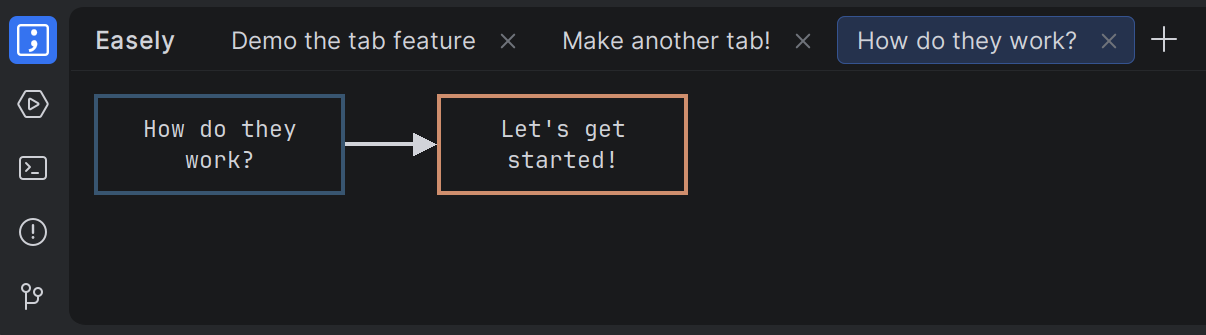
Three graphs open in Easely, showing the right-most tab with the same tab name as the text in the goal node

The most delightful aspect of the tabs is that the goal node’s text is reflected in the tab name with dynamic updates: just change the node name and watch the change on the tab at the same time. Keep an eye on the right unit of work at a glance.

Easely makes use of the default tabbed functionality available to tool windows, which comes with familiar behaviour. Tabs may be added or removed by a mouse click or via hotkey. There are also hotkeys available for switching between tabs, according to your keymap setting.

The Future for Tabs

This dear user of mine also requested a follow-on addition to tabs: automatically swap to the last tab which was used for a given context, or create one if Easely is encountering this context for the first time. The context which was requested was based on switching branches in git.

This portion of the feature request is quite similar to an idea I had for switching graphs, but it was based on two other contexts: changelists and tasks. I can wrap these contexts up together in a configurable feature for automatically switching between graphs (or disabling it if people don’t want to use it 🙂).

See you around on the next update - I’ll make an effort to increase my communication.

Read More